- Visual Studio 2010 Professional [from MSDNAA] msdn01.e-academy.com/sdsu_cse, your login is your email and you chose your password in class
- XNA Game Studio 4.0 and its tools [from AppHub]
Game1.cs from Monday
3.1 Behind the Scenes
- notice that a couple of class-level variables are provided automatically, as well as a constructor for Game1 and five other methods. The first class-level variable is of the type GraphicsDeviceManager.
- first class-level variable is of the type GraphicsDeviceManager. This is a very important object because it provides you, as a developer, with a way to access the graphics device on
- your PC,
- Xbox 360, or
- Windows Phone 7
- GraphicsDeviceManager object has a property called GraphicsDevice that represents the actual graphics device on your machine. Because that graphics device object acts as a conduit between your XNA game and the graphics card on your machine (or more accurately, the Graphics Processing Unit, or GPU, on the graphics card), everything you do on the screen in your XNA games will run through this object.
- second variable is an instance of the SpriteBatch class. This is the core object you’ll be using to draw sprites. In computer graphics terms, a sprite is defined as a 2D or 3D image that is integrated into a larger scene. 2D games are made by drawing multiple sprites in a scene (player sprites, enemy sprites, background sprites, etc.)
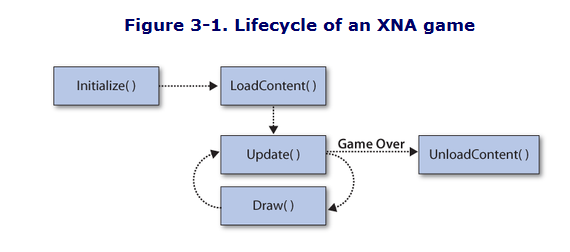
- Initialize method is used to initialize variables and other objects associated with your Game1 object. Your graphics device object will be instantiated at this point and can be used in the Initialize method to help you initialize other objects that depend on its settings. You’ll use this method to initialize score values and other such items in later chapters in this book.
- LoadContent method is called after the Initialize method, as well as any time the graphics content of the game needs to be reloaded (e.g., if the graphics device is reset due to the player changing the display settings, or something like that). The LoadContent method is where you will load all graphics and other content required by your game, including images, models, sounds, and so on
- the Game1 object will enter into something known as a game loop. Almost all games use some form of game loop, regardless of whether they are written in XNA. This is one area where game development differs from typical application development, and for some developers it can take a bit of getting used to
3.2 Game Development Versus Polling
- key difference between game development and typical application development is the concept of polling versus registering for events. Many nongame applications are written solely for events driven by users
- in contrast, game development is driven by polling for events, rather than waiting to hear that an event has taken place. Instead of the system telling the game that the user has moved the mouse, for example, your game will have to ask the system whether the mouse has moved. In the meantime, the application is always performing actions, regardless of user input.
- Tip:
In reality, all applications are built with loops that function in similar ways to a game loop. Windows itself uses a messaging and events system that constantly loops and lets applications know when they need to repaint themselves and perform other functions. Access to these loops is hidden by default, however, because most applications do ont require access to such nonuser-driven events. - Update method there are a couple of lines of code that tell the game to exit when the
player presses the Back button on his gamepad:
if (GamePad.GetState(PlayerIndex.One).Buttons.Back ==
  ButtonState.Pressed)
    this.Exit( );
This is how the game shuts down on the Xbox 360 or in Windows when an Xbox 360 controller is being used (otherwise, you can click the red X on the window to close it or use Alt-F4 to shut down the application). As mentioned earlier, the Update method is where you update everything to do with the game. You can update the positions of items on the screen, scores, animation sequences and so on. You’d also check for user input, detect collisions, and adjust any artificial intelligence (AI) algorithms in your Update method. - Draw method is where you take all of the objects in your game and draw them on the screen itself, using the graphics device object mentioned earlier. In your current application, the only thing in the Draw method is a line of code that uses the graphics device object to clear the display and set the color to CornFlowerBlue (we’ll talk about that in more depth momentarily).
- there are two possible outcomes from the Update method: either it will continue in the game loop and the Draw method will be called or, if the game is over, it will exit the game loop and the UnloadContent method will be called. The game loop ends when you call the Game class’s Exit method, just as your game does by default when the user presses the Back button on the Xbox 360 controller. The game will also exit the game loop if the player presses Alt-F4 or hits the red X button to close down the game window.
- Once the game exits the game loop, UnloadContent is called. This method is used to unload any content loaded in the LoadContent method that requires special unload handling.
- Typically, XNA (like .NET) will handle all your garbage collection for you, but if you’ve modified memory in some object that requires special handling, the UnloadContent method will allow you to take care of that here.
3.3 Modifying Your Game